by TechNova | Feb 14, 2025 | Tech Insights
The iPhone SE 4 release date and features have finally been revealed, and if you’ve been holding out for an affordable iPhone with solid upgrades, your patience is about to pay off. Apple’s latest budget-friendly iPhone is shaping up to be a game-changer, blending premium features with a price that won’t make your wallet cry.
iPhone SE 4: A Budget Phone With Flagship DNA
The iPhone SE 4 might be Apple’s most exciting SE model yet. If you’ve ever wanted an iPhone that doesn’t break the bank but still offers a premium experience, this one checks a lot of boxes. Gone is the outdated home button design—Apple is finally giving the SE lineup a fresh new look.
This new model is expected to borrow heavily from the iPhone 14’s design, meaning we’re saying goodbye to thick bezels and hello to Face ID. That’s a huge deal if you’ve been waiting for an SE model that feels modern. I don’t know about you, but this might be the first time I seriously consider an SE as my daily driver.
iPhone SE 4 Features: What’s New?
Apple has a habit of sprinkling just the right amount of flagship-level features into its SE line without overshadowing its pricier models. The iPhone SE 4 follows that tradition while making some meaningful upgrades.
A Fresh, Modern Design
Remember when people complained that the SE felt outdated? Apple listened. The iPhone SE 4 ditches the old iPhone 8-style frame in favor of a more modern look, likely similar to the iPhone 14. That means:
- No more home button—Face ID is finally here.
- A larger OLED display with slimmer bezels.
- A tougher design, probably with Ceramic Shield protection.
This is a big deal because it means the SE lineup is finally catching up to Apple’s newer aesthetic. If you’ve been clinging to an older model just for the home button, it might take some getting used to. But trust me, once you experience a full-screen iPhone, there’s no going back.
More Power Under the Hood
Performance matters, even in a more affordable model. The iPhone SE 4 is rumored to pack Apple’s A16 Bionic chip—the same one found in the iPhone 14 Pro. That means faster speeds, better efficiency, and long-term support through future iOS updates.
If you multitask a lot or love gaming on your phone, this upgrade is going to be noticeable. Apple’s A-series chips have always been ahead of the curve, so even though this is a budget iPhone, it won’t feel slow anytime soon.
Camera Upgrades You’ll Appreciate
Let’s be honest—camera quality is one of the first things people care about when buying a new phone. The iPhone SE 4 is expected to get a big upgrade, moving away from the single-lens camera setup of its predecessor. Some rumors hint at a dual-camera system, which would mean:
- Better low-light performance.
- Enhanced portrait mode with natural depth effects.
- Potentially improved video recording capabilities.
Apple has been leading the pack when it comes to smartphone cameras, even on its lower-end models. If photography is important to you but you don’t want to spend iPhone Pro-level money, this could be a great option.
Battery Life and Charging: A Step Forward?
Battery life has often been one of the SE’s weak points. Thankfully, it looks like the iPhone SE 4 is making some improvements. A bigger battery, combined with the efficiency of the A16 chip, should provide noticeably longer battery life.
There’s also talk of USB-C charging—yes, you read that right! Apple seems to be finally phasing out the Lightning port in favor of USB-C, aligning with the iPhone 15 lineup. That means easier compatibility with other devices and potentially faster charging speeds.
Who Should Upgrade to the iPhone SE 4?
So, is this new iPhone for you? Here’s who will get the most out of the iPhone SE 4:
- Anyone using an older iPhone SE (or an iPhone 8 or earlier).
- People who want an affordable iPhone with modern features.
- Users who prefer smaller devices but don’t want to sacrifice performance.
If you’re still using an iPhone SE from a few years ago, this upgrade will feel like a massive leap forward. You’ll get better performance, a larger display, and improved security with Face ID. But if you have an iPhone 13 or newer, the changes might not be worth it—unless you really want that SE price tag.
Final Thoughts: Is the iPhone SE 4 Worth It?
The iPhone SE 4 is shaping up to be Apple’s best budget iPhone yet. It’s got the right mix of modern design, improved performance, and essential features without the premium pricing. If you’re in the market for a reliable, long-lasting phone that won’t break the bank, this could be the sweet spot.
At the end of the day, it depends on what you need. If you’re someone who wants all the fancy Pro features, this might not be the phone for you. But if a no-nonsense, future-proof iPhone is what you’re after, the SE 4 is definitely worth considering.
What do you think? Does this new SE finally tempt you to upgrade? Let’s hear your thoughts!
by TechNova | Feb 14, 2025 | Tech Insights
If you’ve been waiting for the perfect time to snag a pair of Bose Headphones and Earbuds, President’s Day is your moment. The holiday sales bring big discounts on some of the best noise-canceling headphones and earbuds out there, making it easier than ever to upgrade your audio setup. Whether you’re looking for a top-tier listening experience for work, travel, or just zoning out with your favorite playlist, Bose has a deal for you.
Why Bose Headphones and Earbuds are Worth It
We all know that feeling when a song hits just right—clear, immersive, and transporting you to another world. That’s exactly what Bose delivers, and it’s why their headphones and earbuds have such a dedicated following. The brand has been perfecting audio technology for decades, offering industry-leading noise cancellation, deep bass, and crisp highs.
If you’ve ever used a pair of Bose headphones on a long flight, you know the magic. The hum of the plane disappears, and suddenly, you’re lost in the music or fully engaged in a podcast. Whether you need silence to focus or just want pure, uninterrupted sound, Bose has mastered the art.
The Best Bose Headphones and Earbuds on Sale
So, what are the top Bose Headphones and earbuds to grab during the President’s Day sale? Let’s break down the best deals and what makes each one stand out.
Bose QuietComfort Ultra Headphones
The QuietComfort Ultra is the ultimate noise-canceling headset for those who value comfort and sound quality. These aren’t just made for music—they’re designed for all-day wear. The plush ear cushions and lightweight design make them easy to wear for hours, whether you’re at the office or on a long-haul flight.
- Exceptional noise cancellation—ideal for travel or focus time.
- Immersive audio—deep, balanced sound that adapts to your surroundings.
- Comfortable fit—perfect for long listening sessions.
- Battery life—lasts for hours, so you’re not constantly charging.
I took the QuietComfort Ultra on a recent road trip, and they completely changed the experience. No more wind noise, no distractions—just clear, pristine sound.
Bose QuietComfort Earbuds Ultra
If you want that same noise cancellation in a smaller, more portable form, the QuietComfort Earbuds Ultra are a fantastic pick. These pack an impressive sound punch while fitting snugly in your ears, making them perfect for workouts, commutes, or just escaping into your own world.
- Compact and powerful—small enough to take anywhere but packed with rich audio.
- Secure fit—won’t fall out during movement.
- Adaptive noise cancellation—blocks out distractions automatically.
- Long battery life—great for all-day listening.
I’ve taken these on morning runs, and they stay put without any annoying adjustments. Plus, the sound quality makes even tired playlists feel fresh.
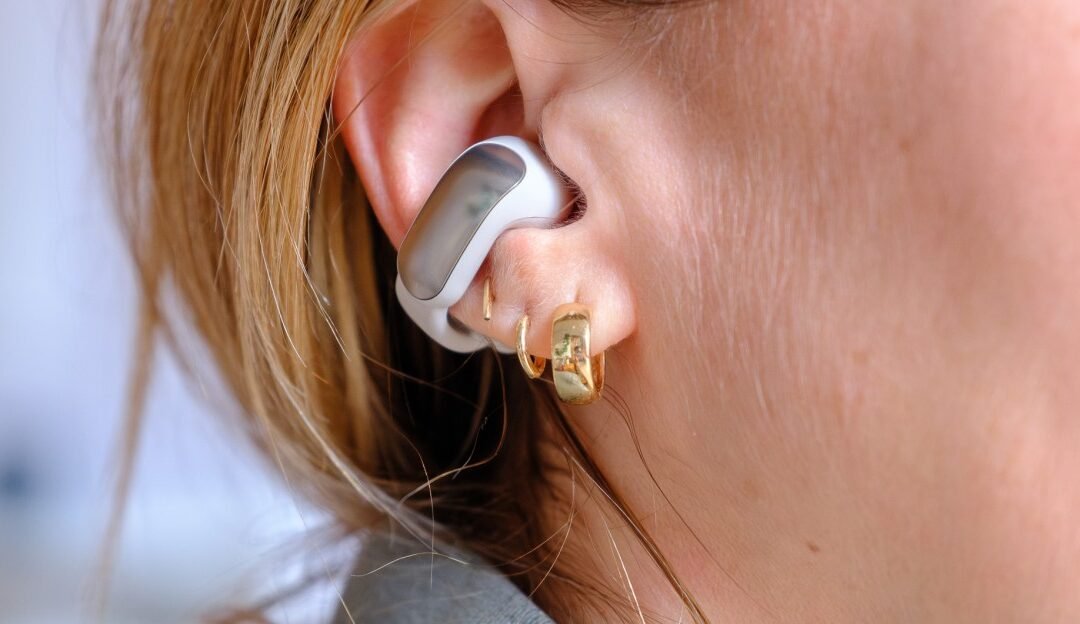
Bose Open Earbuds
For those who don’t love the feeling of traditional earbuds, these are a game-changer. Instead of sealing off your ears entirely, they rest on the outside, giving you an open yet immersive audio experience. Perfect for those who like to stay aware of their surroundings while still enjoying high-quality sound.
- Unique open-ear design—great for situational awareness.
- Lightweight and comfortable—barely noticeable during wear.
- Solid battery life—so you’re not always reaching for the charger.
- High-quality audio—even with the open design, you get clear, rich sound.
I tested these while biking, and they’re perfect for staying safe without sacrificing great audio.
How to Choose the Right Bose Headphones or Earbuds
So, with all these options, which one should you grab? Here’s how to decide:
- For frequent travelers: The QuietComfort Ultra Headphones are unbeatable.
- For workouts or commutes: The QuietComfort Earbuds Ultra will keep you focused.
- For everyday use and comfort: The Bose Open Earbuds are the most lightweight and breathable.
Think about when and where you’ll use them most. If you’re constantly on the go, something compact might be best. If you mainly listen at home or work, comfort and sound depth should be the priority.
Final Thoughts on Bose’s President’s Day Deals
President’s Day sales don’t last forever, and Bose rarely offers big discounts like this. If you’ve been debating upgrading your headphones or earbuds, now’s the time. Quality sound is an investment in your daily life—whether it’s for concentration, relaxation, or just enjoying music the way it was meant to be heard.
So, which ones are you eyeing? Whether you go for the top-tier QuietComfort Ultra or something sleek and portable, you really can’t go wrong with Bose headphones and earbuds. Happy listening!
by TechNova | Feb 13, 2025 | Tech Insights
Something exciting is brewing in the world of Apple! The tech giant has teased an Apple Special Event for February 19, and the anticipation is already through the roof. If you’ve been paying attention to Apple’s recent moves, you know they don’t just throw events out there for nothing. They always have something up their sleeve, whether it’s a jaw-dropping product reveal or a sneak peek into the future of technology.
What Makes This Apple Special Event So Intriguing?
Apple events aren’t just about flashy presentations—they set the tone for the entire tech industry. But this one feels different. Unlike their usual highly-publicized keynote events in September for iPhones or June for software updates at WWDC, this event came with a subtle yet intriguing teaser. That alone is enough to make tech enthusiasts like us sit up and take notice.
What’s Apple planning? A surprise product launch? A futuristic piece of tech that’ll have us all reaching for our wallets? Whatever it is, Apple sure knows how to keep us guessing.
Possible Announcements at the Apple Special Event
Speculation is running wild, and honestly, that’s half the fun of these things! Apple’s teasers are usually cryptic, but they often give little hints if you look closely. Here are some possible announcements we could see on February 19:
A New iPad or a Fresh Take on the iPad Lineup
The iPad lineup has seen some incredible updates in recent years, but it feels like we’re due for something special. Could Apple be introducing an all-new iPad Pro with even better performance and battery life? Or maybe they’ll finally give us that elusive iPad with an OLED display—a dream for anyone who loves watching content on the go.
A Surprise MacBook Drop?
Apple’s MacBooks have been on fire since the introduction of their in-house M-series chips, but there’s always room for more innovation. Could this be the moment when they unveil a refreshed MacBook Air or, dare I say, a completely redesigned MacBook Pro? The latter might be a long shot, but with Apple, anything is possible.
A New Apple Watch… or Something Wearable?
While Apple usually saves big Apple Watch announcements for the fall, this event might be an opportunity to introduce a refreshed Apple Watch Ultra or a brand-new wearable product. Could we finally be getting a sleek new health-focused device? Smart rings have been gaining traction lately, and if anyone can make wearables cooler, it’s Apple.
More on Vision Pro?
We can’t ignore one of Apple’s most ambitious products in years—the Vision Pro. If Apple is having an event now, there’s a solid chance we’ll see some major updates or enhancements. Maybe they’ll talk about a wider rollout, developer tools, or even some new software capabilities. It’s still early days for this device, but Apple surely has big plans.
Why This Event Matters
Some might ask, “Why all the fuss over an Apple event?” But if you’ve been following Apple for years, you know that these moments shape the industry. Even if you’re not an Apple user, their innovations often trickle down to competitors, improving technology across the board.
Think about past events—when Apple ditched headphone jacks, people thought they were crazy. Now, most flagship phones don’t have them. When they introduced Apple Silicon, no one expected the disruption it would cause in the laptop industry. Apple isn’t just another tech company; they set trends, whether we like it or not.
What Could Make This Apple Special Event a Game-Changer?
Apple doesn’t just release products; they create experiences. So, what would make this event one for the history books?
- A revolutionary product: Something brand-new and unexpected, not just an upgrade.
- A major shift in Apple’s strategy: A shift toward AI-focused products or a new approach to their ecosystem.
- A surprise collab: Apple doesn’t often collaborate with other major tech brands, but if they did, it could change the game.
Whatever the case, Apple clearly has something worth teasing, and that means it’s worth watching.
Final Thoughts—What to Expect from Apple’s February 19 Event
Right now, we’re all in speculation mode, and honestly, it’s fun to imagine what Apple is cooking up. Whether it’s a new iPad, a surprise MacBook, or even a totally unexpected product, one thing’s for sure—Apple knows how to keep us hooked.
So, what do you think? What’s Apple about to unveil? Whatever it is, you can bet we’ll be tuning in, ready to dissect every little detail. Because let’s be real—Apple events always bring something worth talking about.
by TechNova | Feb 13, 2025 | Tech Insights
The wait is over—Apple’s TV app is finally on Android devices. If you’re an Android user who’s been eyeing Apple TV shows or movies but didn’t want to switch ecosystems, this is great news. Apple’s move makes it easier than ever to stream your favorite content, and honestly, it’s about time. So, what does this mean for Android users? And more importantly, how well does it actually work? Let’s dive in.
Why the Apple TV App Coming to Android Devices Is a Big Deal
For years, Apple kept its TV app exclusive to its own devices—iPhones, iPads, and Apple TVs—forcing non-Apple users to either miss out on its content or find workarounds. Sure, you could access Apple TV+ through a web browser, but who wants to deal with that on a phone? Now, with the Apple TV app on Android, that hassle disappears.
This isn’t just about convenience. It’s about Apple expanding its reach in a big way. More people can now subscribe to Apple TV+, rent movies, or buy digital content straight from their Android devices. It also puts Apple in a better position to compete with streaming giants like Netflix and Disney+—and let’s be real, the more competition, the better it is for all of us.
What Can You Do with the Apple TV App on Android?
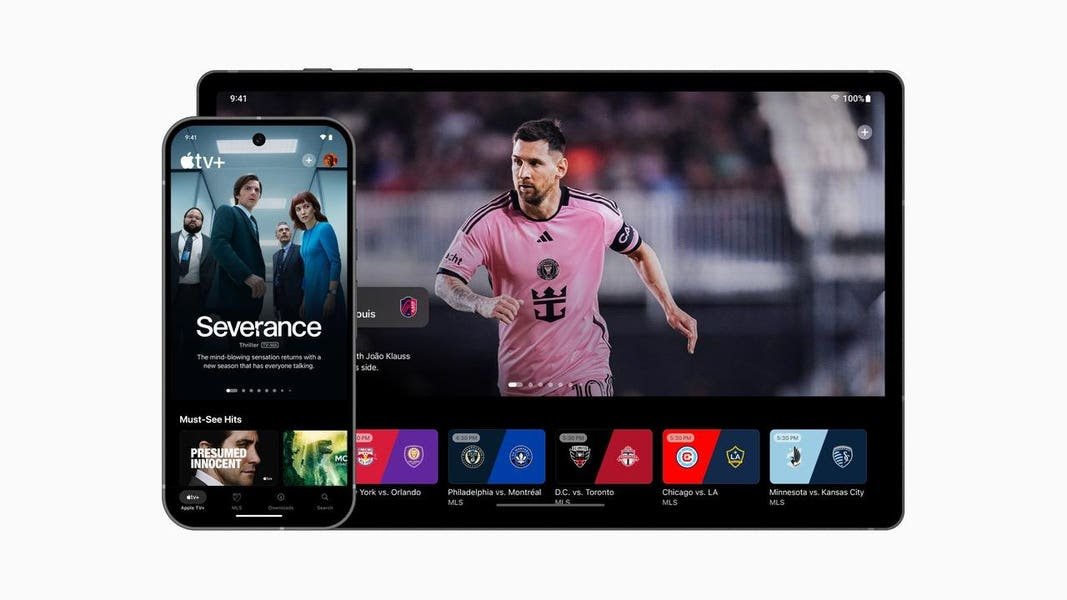
If you’re wondering whether the experience is the same as on an iPhone, the short answer is: mostly, yes. The Apple TV app on Android comes packed with everything Apple users have had for years:
- Access to Apple TV+ with exclusive shows like “Ted Lasso” and “Severance.”
- The ability to rent or buy movies, including classics and the latest releases.
- A personalized “Up Next” section to keep track of what you’re watching.
- Support for content purchased through iTunes (yes, iTunes still exists… kind of).
For Android users who’ve been curious about Apple’s shows, this is a big win. You can now watch Apple Originals without awkward workarounds or streaming from your laptop.
How Does the Apple TV App Perform on Android?
This is the part everyone really cares about: Does it work well? No one wants a laggy, half-baked app that feels like an afterthought. Thankfully, the early impressions seem positive. The interface looks familiar if you’ve used an Apple device before—sleek and minimal. Navigation is smooth, content loads quickly, and the search function actually works well (which isn’t always the case with streaming apps).
One surprising thing? No in-app purchases. That means if you want to subscribe to Apple TV+ or rent a movie, you’ll have to do it through a web browser first. It’s not a huge deal, but it is a slight nuisance. Apple avoids Google Play’s commission fees this way, but it does make for a clunkier user experience.
Streaming Quality and Features
As for playback, the app supports up to 4K HDR streaming where available, which is nice. Whether you’re watching on a phone screen or casting to a TV, the quality holds up—with minimal buffering, assuming your internet is solid.
There’s also support for offline downloads, which is perfect if you’re traveling or have a spotty connection. Just grab your shows or movies beforehand, and you’re good to go.
Is This the Start of Apple Embracing Android?
Apple bringing its TV app to Android might not seem like a huge shift, but in a way, it signals something bigger. Apple is traditionally known for keeping things locked into its own ecosystem. Yet, we’ve seen little cracks in that approach lately—Apple Music launched on Android a while ago, and now Apple TV is following suit.
Could this lead to even more Apple services coming to Android? Maybe. iMessage seems like an impossibility, but who knows? If Apple wants more subscribers, putting its content and services on every platform makes sense.
The Verdict: Should You Download the Apple TV App on Android?
If you enjoy high-quality streaming content—or you’ve been itching to watch an Apple exclusive—then yes, you should absolutely download the Apple TV app for Android. It’s easy to use, the streaming quality is excellent, and it gives Android users another premium content option.
That being said, the lack of in-app purchases is a bit of a hassle, and Apple isn’t exactly bending over backward to make things seamless for Android users. But if that doesn’t bother you too much, it’s a solid addition to your streaming lineup.
So, are you excited to finally have Apple’s TV app on Android, or do you think it’s too little, too late? Either way, it’s nice to have another way to watch great content—no Apple device required.

by TechNova | Feb 12, 2025 | Tech Insights
The Apple Health Study is officially here, and if you’ve ever been curious about how your daily health data can contribute to medical research, now’s your chance to get involved. Apple has teamed up with Brigham and Women’s Hospital to launch this groundbreaking initiative, and the best part? It’s open to everyday people like you and me. No medical degree required—just an iPhone, an Apple Watch, and a willingness to share some insights about your health.
What Is the Apple Health Study?
At its core, the Apple Health Study is all about gathering real-world health data to fuel medical discoveries. It’s a massive research effort designed to track various health metrics and uncover trends that could help doctors and scientists tackle major wellness issues. Think of it as crowd-sourced science, powered by the Apple devices you already use.
Apple has dabbled in health studies before, focusing on things like heart health and mobility. But this time, the scope seems broader. The company is using the Apple Watch and Health app to collect data that could unlock insights into a range of conditions—from heart disease to sleep patterns.
How to Join the Apple Health Study
Joining is surprisingly simple, and you don’t need to be a health expert to qualify. Apple’s goal is to get as many diverse participants as possible, so signing up is a breeze. Here’s how you can be part of it:
- Check Your Eligibility: You’ll need an iPhone and an Apple Watch to participate.
- Open the Health App: Apple makes it convenient—just navigate to the “Studies” section.
- Agree to the Terms: Since this is a real medical research effort, you’ll need to give consent for your data to be used.
- Wear Your Apple Watch Regularly: The study collects data passively, which means you won’t have to do much beyond your everyday routine.
Once you’re in, the study will use sensors in your Apple Watch and iPhone to track things like heart rate, movement, and sleep quality. No extra effort required—just go about your day, and your data will seamlessly contribute to something bigger.
Why Should You Participate?
I get it. The idea of sharing your health data might make you pause. But here’s the thing: studies like these are how we make progress in medicine. The data Apple collects could help researchers detect early signs of diseases, improve treatments, and maybe even save lives down the road.
Personally, I’ve always been fascinated by health tech. I remember the first time my Apple Watch sent me an alert about an irregular heartbeat. It was a wake-up call that made me take my heart health more seriously. Imagine if something as simple as wearing your watch every day could help doctors make groundbreaking discoveries. That’s powerful.
Is It Safe to Share Your Data?
Apple is big on privacy, and they emphasize that all health data is anonymized and encrypted. That means your personal details aren’t tied directly to the study results. Plus, you’re in control—you can opt out anytime if you change your mind.
What Happens After You Join?
Once you sign up, the study runs quietly in the background. Your watch keeps doing its thing, tracking movement, heart rate, and other key metrics. You won’t need to log measurements manually or fill out endless surveys—Apple has designed this for seamless participation.
That said, if you enjoy checking your stats, you can still track your daily health trends inside the Health app. Seeing your progress unfold over time can be a great motivator to stay active, get better sleep, or just be more mindful of your well-being.
Will You Get Personal Health Insights?
This is where things get interesting. While the study aims to improve medical research as a whole, there’s a chance it could also give you valuable insights into your own health. If Apple finds something significant—like irregular heart rhythms—you may even get a notification that prompts you to follow up with a doctor.
Think about it: countless people have discovered hidden health conditions thanks to their Apple Watch. The potential for early detection alone makes participating worthwhile.
Final Thoughts: Should You Sign Up?
Look, if you’re on the fence, I totally get it. Sharing health data is a personal decision. But here’s my take—if you already trust Apple products to help track your workouts, sleep, and heart rate, why not let that data contribute to something bigger?
Medical breakthroughs don’t just happen in labs. They happen when real people, living real lives, provide pieces of the health puzzle that researchers can analyze. And since the study runs passively in the background, it’s probably one of the easiest ways to contribute to science without changing your daily routine.
So, what do you think? Are you in? If you’ve got an iPhone, an Apple Watch, and an interest in shaping the future of health research, this could be your chance to be part of something meaningful. After all, innovation starts with people like us.
by TechNova | Feb 12, 2025 | Tech Insights
The Windows 10 KB5051974 update has made quite the entrance, and not everyone is thrilled about it. If you’ve noticed a sudden appearance of the new Microsoft Outlook app on your computer, you’re not alone. This update is quietly rolling out a revamped version of Outlook, and—surprise—it installs automatically. Whether you love it or hate it, it’s here, and we need to talk about what that means for you.
What’s Changing with the Windows 10 KB5051974 Update?
Let’s get straight to it: this update is pushing the new Microsoft Outlook onto your system without asking for permission. If you’re used to the classic Outlook app or prefer another email client, this might feel a little intrusive. Microsoft’s goal here is to transition users toward a more web-based, modern experience. But is this actually an improvement?
The new Outlook app is essentially a web app (PWA), meaning it’s built to work like the Outlook Web experience rather than the traditional desktop version. That means a sleeker interface, deeper cloud integration, and—unfortunately—some missing features that long-time Outlook users rely on.
How the New Outlook Affects Your Workflow
If you weren’t expecting to switch email apps, this update could throw a wrench into your routine. Here’s what you’ll notice:
- Surprise Installation: The app appears in your Start menu whether you asked for it or not.
- Web-Based Features: The new Outlook relies heavily on cloud integration, making it more like a web app than the old-school desktop client.
- Missing Features: Certain classic Outlook features, such as offline functionality and full add-in support, aren’t available yet.
- Customization Differences: Some familiar settings from the legacy Outlook may not transfer over.
Now, if you’re open to trying something new, this update could be a welcome change. The redesigned interface is clean and user-friendly, making email management a bit smoother, especially for those already using the web version.
Can You Get Rid of the New Outlook?
Maybe you’re thinking, “I didn’t ask for this, so how do I remove it?” Thankfully, you do have some control here. While Windows 10 KB5051974 installs the new Outlook automatically, it doesn’t force you to use it. You can simply ignore it or even uninstall it if you prefer sticking with the classic version.
To remove the new Outlook:
- Open the Start menu and find the new Outlook app.
- Right-click on it and choose Uninstall.
- Confirm your selection.
That’s it—at least for now. However, keep in mind that future Windows updates might try to reinstall it again, so stay vigilant if you strongly prefer the old version.
Why Is Microsoft Pushing This Update?
Microsoft has been making a strong push toward unified experiences across different devices. The new Outlook is part of that vision, aiming to create a consistent experience whether you’re checking email from a browser, phone, or desktop.
From a business perspective, this move makes sense. It streamlines development, integrates deeper with Microsoft 365 services, and nudges users toward cloud-based productivity. But that doesn’t mean everyone is on board with the change, especially those who rely on Outlook’s traditional features.
Is the New Outlook Worth Trying?
So, is this version of Outlook something you should embrace? It depends. If you live in the Microsoft 365 ecosystem and use Outlook Web often, you might find the new version more convenient. It’s snappy, modern, and integrates well with cloud services.
However, if you need advanced offline support, use legacy Outlook plugins, or just don’t want an enforced change, this version won’t be your favorite. Either way, it’s worth testing for a few days before making a final decision.
What You Can Do to Prepare
If you’re worried about future updates shaking up your workflow, here are a few things you can do:
- Keep an eye on your updates—sometimes Windows changes things quietly.
- Test the new Outlook to see if it meets your needs before uninstalling.
- Make sure you have backups of your email accounts and settings, just in case something shifts unexpectedly.
The Bottom Line on Windows 10 KB5051974
Change is never easy, especially when it feels forced. The Windows 10 KB5051974 update drops the new Microsoft Outlook onto your system whether you want it or not. While it brings a fresh design and cloud-based integration, not everyone will appreciate the shift.
At the end of the day, Microsoft is pushing toward a more unified, web-focused Outlook experience. Some users will love it, while others will be scrambling to uninstall it. If you fall into the latter camp, don’t stress—you still have options.
So, what’s your take? Are you embracing the new Outlook, or are you sticking with the classic version as long as possible?
