by TechNova | Feb 3, 2025 | Tech Insights
Big changes are coming to Microsoft’s suite of services. If you’ve been using Microsoft 365’s built-in VPN feature, you might want to sit down for this. Microsoft 365 VPN Feature Discontinues Support, leaving users to figure out their next steps for staying secure online. It’s a shift that might catch some by surprise, especially if this feature was part of your daily toolkit for privacy and remote work. I mean, what’s more annoying than finding out something you rely on is suddenly no longer available, right?
Let’s break this down together and see what’s actually happening, why this decision might have been made, and—most importantly—what you can do about it. If you’re feeling frustrated right now, trust me, you’re not alone. I’ll walk you through why this matters and give you some actionable options to stay ahead.
Why Microsoft 365 VPN Feature Discontinues Support: What’s Behind the Decision?
So, why is Microsoft pulling the plug on this feature? Well, while there hasn’t been a ton of detailed explanation, it’s safe to assume this decision ties into how Microsoft is evolving its services. Companies like Microsoft constantly review their offerings to focus on what’s working and where they can grow. If something isn’t as widely used or isn’t in line with their long-term goals, they’ll often phase it out. And unfortunately, the VPN feature seems to have fallen into that category.
I get it—it’s a huge bummer if this was your go-to for privacy, especially when working remotely. The VPN feature was a reliable option for so many of us because it was baked right into the Microsoft 365 package. It made secure connections easy without requiring extra downloads or subscriptions. Losing that convenience feels like a step back, especially in today’s era where online security is more important than ever.
What Does This Mean for Current Users?
That question’s probably top of mind, and for good reason. If you’re still relying on this feature, the fact that Microsoft 365 VPN Feature Discontinues Support means you’ll need to find an alternative solution—and quickly. Thankfully, you don’t need to panic (although I won’t judge if you feel a little overwhelmed). You’ve still got time to make a smooth transition before the support fully ends. Plus, there are plenty of great VPN options on the market to choose from, depending on your specific needs.
Let’s take a closer look at what steps you can take to ensure your online security stays intact.
How to Adapt When Microsoft 365 VPN Feature Discontinues Support
Alright, so the feature’s getting phased out—now what? Take a deep breath, grab a cup of coffee, and let’s tackle this together. This isn’t the end of the world. You’ve got options, and they’re not as complicated as you might think.
First things first, you need to assess what you’re using a VPN for. Are you focused on securing your connection while working from coffee shops? Do you need it for remote access to work servers? Or is it more about general online privacy? Once you’re clear about your priorities, it’ll be easier to hone in on the right solution.
- Explore Third-Party VPNs: There are so many great VPN services out there, like NordVPN, ExpressVPN, and Surfshark, just to name a few. Most of them are super easy to set up and offer a ton of features that might even outshine what the Microsoft 365 VPN had. Do some research, read reviews, and pick one that fits your needs and budget.
- Check Your Work Policies: If you’re using a VPN for work, now’s a good time to loop in your IT or security team. They might already have a corporate VPN solution in place or can recommend one that’s optimized for your workflow.
- Consider Integrated Security Solutions: Some users love the convenience of all-in-one solutions where your VPN, antivirus, and other security tools live under one roof. If that’s your vibe, check out options like Norton 360 or Bitdefender.
Replacing the Microsoft 365 VPN isn’t just about security—it’s about finding a solution that fits seamlessly into your life. Your needs are unique, and the good news is there are now more customizable VPN options on the market than ever before.
Is This the Start of a Trend?
This decision actually got me thinking—are we going to see more features phased out in products like Microsoft 365? As much as I hate to predict doom and gloom, it wouldn’t surprise me. Tech companies, especially ones as massive as Microsoft, seem to constantly be restructuring their services. Remember when they retired Internet Explorer? Or even some earlier versions of Office? It’s clear they’re focused on aligning their offerings with what they believe is the future of the digital landscape.
While this change might sting for now, it’s also an opportunity to re-evaluate what you’re using and why. Who knows—this might pave the way for bigger, better tools in Microsoft’s ecosystem. Or it might just be a reminder to diversify your approach to online security.
Where Do We Go From Here?
If you’ve made it this far, you’re probably still wondering how this change will affect you in the long run. Honestly, it’s hard to say without more clarity on Microsoft’s larger vision. What I do know is that it’s more important than ever to take control of your own digital security. Relying too heavily on any single service or provider can leave you vulnerable if changes like this pop up.
So here’s my advice: stay informed, don’t panic, and take this as an opportunity to level up your online privacy game. We all hate change, especially when it means extra work, but who knows? You may end up finding a new VPN service that blows the old one out of the water.
The Bottom Line: Moving Forward Without Microsoft 365’s VPN
Losing the Microsoft 365 VPN might feel like a hassle, but it’s far from a dealbreaker. With a little research and planning, you’ll be able to find an even better solution that fits your unique needs. And hey, change is a part of life—and tech. If there’s one thing I know for sure, it’s that something new and exciting is always just around the corner.
Let this serve as a little nudge to re-evaluate your tools, improve your security setup, and maybe even discover something better in the process. You’ve got this—it’s just another curveball in the ever-changing world of tech!

by TechNova | Feb 3, 2025 | Tech Insights
The drama on the NASCAR tracks this season has been absolutely electric, and the “Chase Elliott Denny Hamlin Clash for NASCAR Lead” is just the latest chapter in a story that feels like it only gets juicier with each passing lap. I mean, isn’t this why we’re all glued to our screens and sitting on the edge of our seats every single weekend? Two of the sport’s biggest names, battling it out on the asphalt, leaving tire marks—and maybe some hard feelings—behind them.
When I watched their cars swap paint recently, I couldn’t help but feel a little knot of excitement twist in my stomach. This is what NASCAR is all about, right? Fierce rivalries, bold moves, and a sprinkling of controversy to keep the fans buzzing. Let’s dive into that explosive duel and unpack why it has everyone talking—because, honestly, it’s not just about the lead. It’s something deeper and way more personal.
Chase Elliott Denny Hamlin Clash for NASCAR Lead: What Really Happened?
So here’s the situation: you’ve got Chase Elliott, the hometown hero of NASCAR, adored by fans for his humble demeanor and undeniable talent. And then there’s Denny Hamlin, the more polarizing figure—confident, calculated, and completely unwilling to back down, no matter who’s behind him. When these two locked horns recently, it wasn’t just a battle for the lead; it felt like a battle of egos and philosophies.
During the race, there was a key moment when Hamlin edged out Elliott in a heart-stopping move that made you hold your breath. Elliott didn’t just let it go, though. Oh no, the No. 9 car retaliated with some epic side-by-side action, leading to contact that had fans screaming, “Did you SEE that?!” It was a clean(ish) battle, but the intensity of their back-and-forth spoke volumes. These drivers don’t just want to win—they want to prove something to each other, to the fans, and maybe even to themselves.
Why the Chase Elliott Denny Hamlin Clash for NASCAR Lead Hits Differently
I couldn’t stop thinking about why this particular showdown felt so much bigger than a typical position change. Honestly, rivalries like this are *gold* for NASCAR. They’re what make the sport so raw and real, reminding us that it’s not just about cars circling a track. It’s about personalities, history, and (let’s be real) grudges.
Elliott and Hamlin have clashed before—whether it’s bumping fenders or exchanging snarky comments in interviews. But this time, it felt like there was more on the line. It wasn’t just about this race; it was about setting the tone for the season. Every sport needs its heroes and its villains, and let’s face it: whether you’re Team Elliott or Team Hamlin, you’re invested in this drama.
Here’s the thing about NASCAR fans: we love the personalities as much as the action. Sure, we’re here to see who’s the fastest, but we’re also here for the stories. Whether you’re cheering for Elliott’s cool-headed grit or Hamlin’s no-nonsense aggression, you’ve got to admit the two of them together make sparks, and that’s what keeps this sport alive.
Lessons From the Clash: What Can Drivers (and Fans) Take Away?
As I was watching the race unfold, I started thinking about how these moments teach us so much about resilience and strategy—on and off the track. Let’s break it down:
- Patience Wins Races: Elliott may have had a moment of frustration, but his overall style is methodical and steady. If there’s a lesson here, it’s that staying cool under pressure can save you from wrecking (literally and figuratively).
- Sometimes You’ve Got to Push: Hamlin, on the other hand, is all about taking risks, even if it means ruffling feathers. There’s something to be said for ambition and boldness. Sometimes, shaking things up is the spark you need to make a breakthrough.
- Rivalries Fuel Growth: Look, nobody becomes great in a vacuum. These two are pushing each other, whether they like it or not. Their clashes make both of them better, and if you think about it, that’s a lesson we can all take to heart—competition isn’t a bad thing if it drives improvement.
I think that’s why this skirmish hits us right in the feels. We’ve all had moments where we’ve fought tooth and nail for something we care about, whether it’s a job, a relationship, or (if you’re like me) the last cupcake at a party. Watching these two go at it reminds us that sometimes, what’s at stake isn’t just the prize itself—it’s about proving we’re capable of grabbing it.
What’s Next for Chase Elliott, Denny Hamlin, and the Season?
So where does this leave us moving forward? If you’re anything like me, you’re already wondering how this rivalry will evolve. Will Elliott let Hamlin slide next time, or does he already have a plan to make his point in the next race? Knowing these two, they’re analyzing every second of the footage, trying to figure out how they can one-up each other when they meet again.
One thing’s for sure: this season just got way more interesting. With every lap, there’s a sense of anticipation in the air. It’s not just about who crosses the finish line first—it’s about *how* they do it.
I have to admit, as much as I love a clean race, I kind of live for moments like this. The tension, the grit, the refusal to back down—it’s like a soap opera with engines. Whether you’re rooting for Elliott to rise above or for Hamlin to keep shaking things up, you can’t deny one thing: this rivalry is exactly what NASCAR needs right now.
Final Thoughts: Why We’ll All Remember This Race
If you ask me, NASCAR has always been at its best when it mixes speed with storylines. Watching Chase Elliott and Denny Hamlin throw down for the lead wasn’t just entertaining—it reminded us why we tune in week after week. Sure, we’re here for the thrill of the chase (pun intended), but we’re also here for moments that make us feel something.
So, whether you’re a die-hard fan or just hopping on the NASCAR train, keep your eyes on these two. The season is far from over, and I’ve got a feeling this isn’t the last time their paths will cross in such a dramatic way. Isn’t it exciting when a single clash can ignite so much energy, passion, and conversation? Buckle up, because I think this ride is just getting started.
by TechNova | Feb 3, 2025 | Tech Insights
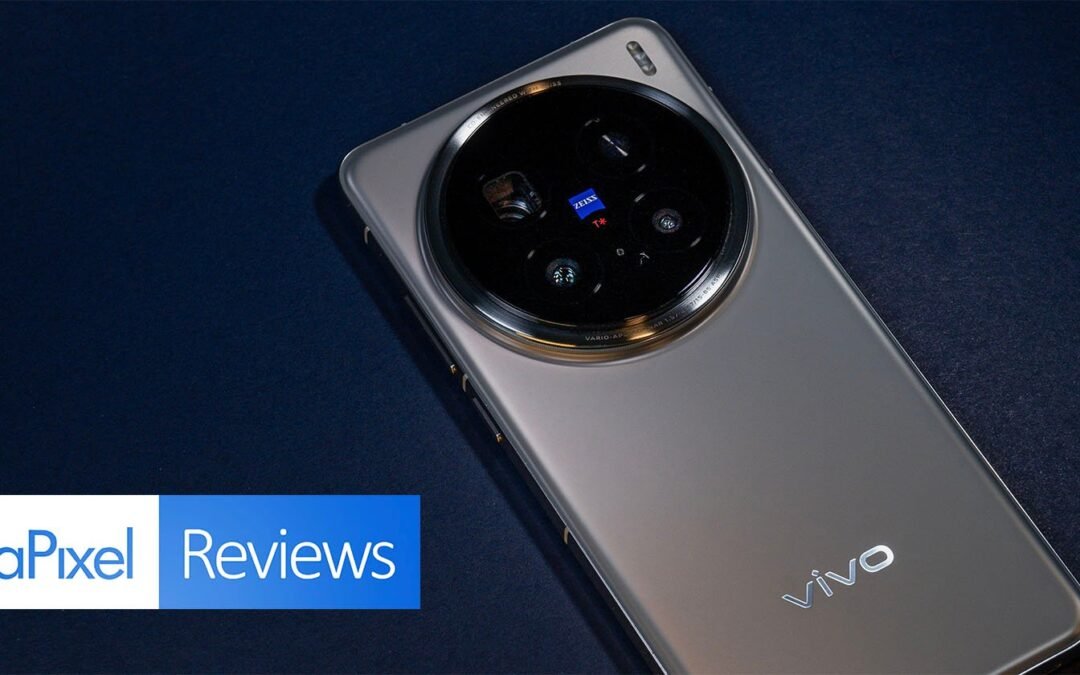
When I first got my hands on the Vivo X200 Pro, I wasn’t quite sure what to expect. Sure, I’d read all the hype and seen the promotional material, but sometimes those just feel like a high-energy sales pitch. That all changed the moment I started digging into its telephoto capabilities. This is more than just another smartphone—it feels like a pocket-sized creative tool made for photographers, creators, and anyone who’s serious about capturing life’s details. So, in this Vivo X200 Pro Telephoto Review and Key Features, let me tell you why this device might just steal the spotlight (and your heart, too).
Stepping Into the Future: Vivo X200 Pro Telephoto Review and Key Features
Let’s talk about the standout feature right away: the telephoto lens. I mean, WOW. The Vivo X200 Pro takes everything you thought you knew about smartphone zooming and flips it on its head. Gone are the days of grainy, washed-out photos every time you try to zoom past your arm’s reach. With this phone, you’re capturing crisp, vibrant images that rival what dedicated cameras can do.
What really makes it special is the periscope-style optical zoom. This isn’t just a gimmick—it’s practical, powerful, and surprisingly easy to use. Whether you’re photographing your best friend laughing across the room or trying to get the perfect shot of a faraway lighthouse on vacation, the results are stunning.
I’ll admit, I almost teared up a little (don’t judge me!) when I zoomed in 10x and saw details I never thought would be possible from a phone camera. Textures, reflections, even the tiniest details in someone’s jewelry—the Vivo X200 Pro captured it all as if I were standing just inches away.
What Makes the Telephoto Lens Stand Out?
Here’s the deal with telephoto on smartphones: it’s often “good enough” but rarely exceptional. The Vivo X200 Pro shatters that standard. Here’s what sets it apart:
- 5x Optical Zoom: Forget digital cropping. The optical zoom means you’re getting real, unaltered detail even at 5x.
- 100x Digital Zoom: Okay, this might sound excessive, but hear me out. It’s not just a bonus feature—it’s usable. Of course, you’re getting partial AI enhancement, but for distant subjects like the moon or skyscrapers? Absolutely stunning.
- Super Night Mode: Taking zoomed-in photos at night used to feel like chasing unicorns. Not here. This mode brightens your subject without sacrificing sharpness or color quality.
Honestly, the telephoto lens feels like a game-changer for anyone who loves photography. As someone who uses my phone for 99% of my photography these days, it’s such a relief to have a camera that handles distance shots and tricky lighting conditions like a pro.
The Rest of the Camera System: More Than Just Telephoto
While the telephoto steals the show, the Vivo X200 Pro is a complete photography powerhouse. With its triple camera setup—including a wide-angle and ultra-wide-angle lens—you’re covered no matter how you like to shoot.
The wide-angle lens produces images so clean and bright that it made me rethink my DSLR. Meanwhile, the ultra-wide-angle lens is perfect for group shots or capturing epic landscapes. I took the Vivo X200 Pro on a hiking trip last weekend, and the mountain views looked nothing short of majestic.
One feature that surprised me? The macro photography mode. Yes, it’s been done before, but the level of detail this phone captures is bonkers. I was photographing a flower’s petals up close, and I could see individual grains of pollen.
Design and Usability: Is It Even a Phone?
Let’s talk design for a second, shall we? The Vivo X200 Pro doesn’t just stop at being functional; it’s beautiful. The slim design, polished finish, and perfectly balanced weight make it feel luxurious in your hand. It’s available in two stunning colors, both of which scream sophistication.
But more importantly, it’s actually comfortable to use. Sometimes, phones that pack so much tech feel bulky or awkward, but not this one. Whether you’re shooting one-handed or setting up for a professional-grade photo, it feels effortless.
Oh, and the display? Absolute chef’s kiss. That AMOLED screen is bright, color-popping brilliance. When reviewing the photos I’d taken, I couldn’t stop marveling at how faithfully they were reproduced on the screen itself.
Battery and Performance: Can It Keep Up With Your Adventures?
You know what’s worse than missing a once-in-a-lifetime photo because your phone’s battery died? Absolutely nothing. Thankfully, the Vivo X200 Pro has your back. The 5000mAh battery held strong through an entire day of heavy use.
I was snapping pictures of cityscapes, editing them, then jumping into some Netflix while commuting home—and the battery barely broke a sweat. Plus, if you ever DO find yourself running low, the fast charging gets you back up to speed in minutes.
Performance-wise, it’s buttery smooth. Apps open instantly, there’s no lag while toggling between the camera and editing apps, and even gaming feels like a breeze.
Who Is the Vivo X200 Pro For?
So, should you consider the Vivo X200 Pro? In my opinion, it’s perfect for:
- Photography Enthusiasts: If capturing life’s moments is your thing, this phone will make you happier than a kid in a candy store.
- Frequent Travelers: The versatility of the telephoto, wide-angle, and ultra-wide-angle lenses gives you options for every adventure.
- Everyday Users: Even if you’re not a photography nerd, having a phone that consistently delivers amazing photos feels like magic.
On top of that, it’s great for anyone who values sleek design and top-tier performance. Seriously, this thing is a beast.
Final Thoughts: Why This One Stands Out
After using the Vivo X200 Pro for a few weeks, I can confidently say this: it’s not just a phone, it’s a creative companion. If you’re someone who lives for the perfect shot, whether it’s a close-up, a faraway mountain, or a starlit sky, this phone delivers in every way imaginable.
Sure, no phone is perfect, but this one comes awfully close. It’s reliable, stylish, and powerful—and that’s a combination that’s hard to beat. For me, the telephoto lens alone makes it worth every penny.
So, what do you think? Ready to unlock your inner photographer? Trust me, with the Vivo X200 Pro in your hands, you’ll see the world through an entirely new lens.

by TechNova | Feb 3, 2025 | Tech Insights
As an Apple lover (and, let’s face it, an all-around tech nerd), I’m always excited to see how the folks at Cupertino keep managing to surprise us. This time, it’s all about the “Apple Event Invite Feature Confetti Launch Details”—a shiny new feature that promises to make one of Apple’s most iconic traditions even more fun and engaging. Whether you’re a die-hard Apple user or just someone who loves a good sprinkle of tech magic, this is one update you won’t want to miss.
So, what exactly is this confetti thing, and why is it getting the tech world buzzing? Let’s dive in and unpack the details!
What Is the Apple Event Invite Feature Confetti Launch?
First off, let’s talk about what this new feature actually is. You know the Apple invites we all eagerly anticipate before their big keynote events? Those beautifully designed digital teasers that make us circle our calendars in excitement? Well, Apple is reportedly leveling up the experience with an interactive feature code-named “Confetti.”
Apparently, when someone RSVPs to an Apple event on their device (we’re talking iPhone, iPad, or even your Mac), this new feature will trigger an animated “confetti” effect. Think bursts of color, subtle animation, and that trademark Apple polish that turns even the smallest interaction into something delightful. It’s not just about the practicality of confirming attendance—it’s about making that moment feel special. Honestly, I love the idea of injecting a little bit of playful joy into what’s typically a mundane part of the process.
Why Does This Small Detail Matter?
Now, you might be thinking, “Okay, it’s cute, but is this really that big of a deal?” And I get it—it’s easy to dismiss something like digital confetti as just a fun little gimmick. But here’s the thing: Apple has always been about creating experiences, not just products. They know how to take the ordinary and make it feel extraordinary.
Think about how you felt the first time you sent a message using iMessage’s screen effects—balloons floating up when you wished someone “happy birthday” or the fireworks that lit up when you celebrated something big. It wasn’t a major feature, but it added something special to the everyday. That’s what this confetti feature seems to be about, too. It’s a lovely little surprise that makes the simple act of RSVPing to an event feel exciting.
And honestly, isn’t that what we need more of these days? A little joy, a little delight, a little “wow” in the everyday moments.
Possible Features Based On Apple Event Invite Feature Confetti Launch Details
Okay, let’s indulge in a bit of speculation. Apple hasn’t officially detailed everything about this feature yet, but based on what’s been leaked, here’s what I’m guessing might be part of the package:
- Customized Confetti Themes: Imagine if the confetti’s design tied into the theme of the event. A springtime Apple event? Think pastel colors and floral shapes. A fall product reveal? Maybe we’re looking at leaves in shades of orange and gold.
- AR-Enabled Animation: It wouldn’t be too far-fetched to think Apple might incorporate augmented reality into this. Could the confetti “spill out” of your screen and into your room? It’s exactly the type of magical little touch Apple is known for.
- Personalized Reactions: This would take it to the next level—confetti that animates differently depending on the RSVP device. The tiny details always set Apple apart, so I wouldn’t be surprised to see this happen.
The possibilities are pretty exciting, right? It’s almost like opening a tiny tech-gift every time you interact with an invite.
The Apple Experience We All Know and Love
What’s truly fascinating about Apple’s approach is how they focus so much on the experience rather than just the functionality. They could’ve simply sent a basic RSVP confirmation with a button. But no, they decided to go the extra mile and make it…well, fun. That’s what makes Apple different.
This feature might also say a lot about Apple’s confidence right now. It’s like they’re saying, “We’ve nailed the big stuff—now, let’s make the little things unforgettable, too.” It’s a philosophy that bleeds into everything they do, from the way their hardware feels in your hands to the delightful sounds of their software.
And speaking of joy, have you ever noticed Apple’s knack for creating “waiting anticipation”? I remember attending my first in-person Apple store event years ago, and just walking through the doors felt ceremonial. You could see the thought they’d put into every moment.
This confetti feature kind of feels like the digital version of that—making your Apple event journey feel special from the moment you RSVP.
What Could This Mean for Future Apple Events?
Here’s where I get really excited: If this is the level of detail Apple is investing in their invite process, what does that mean for the events themselves? Could we see even more interactivity built into virtual and live Apple events down the road? I’d love to see real-time features like this confetti concept integrated into live streams, apps, or even AR headsets (hello, Apple Vision Pro!).
Plus, Apple is all about creating ecosystems. This confetti feature could just be laying the groundwork for something much bigger. We could see these types of flourishes embedded into Apple’s ecosystem in ways we can’t even imagine yet.
Will Other Companies Follow Suit?
Let’s be real—when Apple does something bold, the rest of the industry tends to follow like a line of ducks. I wouldn’t be surprised if we start seeing brands like Google or Samsung attempting their own versions of this. But Apple does have one major advantage: their ability to make these features feel natural, seamless, and just plain magical.
You know how it is—when Apple sprinkles digital confetti, it feels like they’re throwing a party just for you.
Final Thoughts on the Apple Event Invite Feature Confetti Launch Details
All in all, this might seem like a small, playful feature on the surface—but it represents something bigger. It’s about how Apple continues to keep their identity firmly rooted in creating joy, magic, and connection through technology.
Sure, it’s just confetti. But it’s happy confetti, **Apple confetti**, and most importantly, it’s a reminder that even the tiniest details can delight us when done with care and intention. And in the end, isn’t that what keeps us coming back to Apple again and again?

by TechNova | Feb 3, 2025 | Tech Insights
The phrase “Gmail AI Hack Puts 2.5 Billion Accounts at Risk” sounds like something out of a dystopian tech novel, doesn’t it? But here we are, living it. If you haven’t already heard, there’s a massive buzz going around about how hackers have found a way to exploit Gmail’s AI tools, and yes, it’s put billions of users (including me, and probably you) in a pretty vulnerable spot. Honestly, hearing this made me stop and think: “What else don’t we know about the security of the tools we rely on every day?”
The bottom line? No email account is invincible, even if it’s backed by one of the biggest tech giants in the world. What’s happening here isn’t just your everyday phishing scam—it’s a whole new level of sneaky, AI-driven hacking that’s enough to make anyone uneasy about opening their inbox.
How This Gmail AI Hack Puts 2.5 Billion Accounts at Risk
Okay, let me break it down in plain terms: The attack leverages AI systems within Gmail in ways they were *never* intended to be used. Hackers figure out loopholes in the AI’s coding and use those vulnerabilities to trick the system. This isn’t just some kid in a basement guessing your password—this is high-tech, calculated, and, quite frankly, scary.
The scary part is that Gmail’s AI, which was created to make our lives easier (think auto-sorting emails into folders or suggesting replies), could potentially turn against us when abused. By slipping past Gmail’s defenses, hackers can bypass spam filters, blend malicious links into otherwise harmless-looking emails, or even deceive the system into thinking harmful content is legit. That’s wild, right?
If you’re sitting there scrolling through your inbox while reading this, I don’t blame you. I did the same thing. You start looking at every email with a side-eye, wondering if it’s real or something waiting to wreck your life.
Who Is at Risk (Hint: Pretty Much Everyone)
The fact that the Gmail AI hack puts 2.5 billion accounts at risk means the sheer scale of it is unprecedented. That’s a huge number of people. If you’ve got a Gmail account for work, personal use, or even the family recipes your aunt likes to share every week, you could be a target. No one gets a “get-out-of-jail-free” card when it comes to hacks like this. Big corporations, small businesses, everyday users like us—we’re all fair game.
Here’s the kicker. This isn’t limited to just your Gmail inbox. Once hackers get in, they could potentially access any connected account tied to the same email. Think about it: Your banking app, your social media accounts, or even your shopping accounts where credit card details are stored—they all link back to that one central account. The domino effect could snowball faster than you’d expect.
Signs Your Gmail Account Might Be Compromised
I get it. The idea that the Gmail AI hack puts 2.5 billion accounts at risk can leave you feeling pretty helpless. But the good news is, if you’re proactive, you can stay one step ahead. The first step is to recognize if there’s a problem in the first place. Keep an eye out for these red flags in your Gmail account:
- Unusual activity: Did you suddenly get a bunch of failed login notifications? Or maybe Gmail is alerting you about a login from a device you don’t recognize? Red flag!
- Emails you didn’t send: If friends or coworkers are asking why you’ve been sending them weird emails with shady links, chances are your account’s been hijacked.
- Changes to account settings: Check if your recovery email or phone number has suddenly changed. If it has, you need to act immediately.
- Spam overload: If you’re seeing more spam than usual in your inbox or even spam disguised as genuine emails, take it seriously.
These signs aren’t just random glitches—they’re warnings that something isn’t right. Trust your gut when you see them.
How to Protect Yourself from This AI-Powered Threat
Alright, now that we’re all sufficiently freaked out, let’s focus on the solutions. Because, spoiler alert: You’re not entirely defenseless. There are steps you can take to make your Gmail account less of a sitting duck for hackers.
- Enable two-factor authentication: If you haven’t already done this, what are you waiting for? Seriously. It’s one of the easiest, most effective ways to add an extra layer of security. With 2FA, even if hackers crack your password, they’ll need a second verification step, which is way harder to bypass.
- Be wary of attachments and links: I know this sounds obvious, but sometimes curiosity gets the best of us. Don’t click on anything that feels even slightly off. When in doubt, just don’t.
- Audit third-party apps: Connected apps might seem harmless, but if one of them gets compromised, it’s like handing over a key to your inbox. Revoke access to apps or services you don’t use anymore.
- Perform regular security checks: Gmail actually has a built-in security check-up tool—use it! It’ll flag unrecognized devices, risky apps, and weak passwords.
- Update your password: No, not just “password1234” with a capital P. Use something unique, long, and hard for hacking tools to crack.
Taking these precautions might feel like extra work, but trust me—it’s worth it. Once you’ve been hacked, the cleanup process is exhausting and can take weeks, even months.
A Wake-Up Call for All of Us
If nothing else, this Gmail AI hack serves as a serious wake-up call. Yes, technology makes our lives easier, but it also comes with new risks. Think about how much of your life is tied to your email. It’s not just messages—it’s passwords, personal information, even memories through shared photos or conversations. Losing access or having that compromised can feel like someone walking into your house uninvited.
Sometimes it takes threats like this to remind us to stay vigilant. Cybersecurity isn’t just for tech experts anymore—it’s something we all have to care about. So take a deep breath, check your accounts, and make those changes that you’ve probably been putting off for way too long. You’ll thank yourself later.
What about you? Have you ever had a moment where your email or online accounts were compromised? If so, how did it happen, and what did you learn from it? Let me know—I’d genuinely love to hear your story (and maybe swap tips on staying safe). After all, we’re all in this together.

by TechNova | Feb 3, 2025 | Tech Insights
Elon Musk Satellites Enable Global Phone Calls. Let’s take a moment to appreciate the extraordinary sentence I just typed—it sounds like something out of a sci-fi movie, doesn’t it? But here we are, living in a world where this is no longer science fiction. Thanks to Elon Musk’s Starlink satellite network, you can now make phone calls from virtually anywhere on Earth, even those remote spots where cell towers are barely a dream. This development is nothing short of revolutionary, and it’s completely changing how we stay connected with each other.
Imagine hiking in the middle of nowhere, totally off-grid—no Wi-Fi, no cell signal. That used to mean you couldn’t call anyone even if you wanted to. Now? All you’d need is a smartphone that can tap into Musk’s satellite system, and boom, you’re chatting away like you’re standing in your living room. It feels almost magical, yet it’s all grounded in some serious tech wizardry. But how exactly did we get to this point, and what does it mean for our everyday lives?
How Elon Musk Satellites Enable Global Phone Calls
Let’s break this down a bit. Traditional mobile networks rely on ground-based cell towers to provide coverage, right? Pretty simple. But here’s the snag: cell towers only cover regions where they’re physically installed. This means rural areas, mountains, deserts, and vast stretches of ocean are practically dead zones. That’s where Musk’s satellites come in to shake up the game entirely.
Instead of relying on ground infrastructure, Starlink satellites orbit the Earth in low Earth orbit (LEO)—thousands of them, creating what’s called a “satellite constellation.” These satellites beam internet (and now, phone service!) directly to your device. It’s an elegant solution to a messy problem. No cell towers? No problem. Thanks to the satellite network, you’re covered wherever you are on the globe.
But let’s not overlook just how daring this whole concept is. The sheer scale of deploying thousands of satellites into space is mind-blowing. Think of it like throwing a massive blanket over the entire Earth, ensuring there’s a steady connection no matter where life takes you. And this isn’t just good news for adventurous souls climbing Everest; it’s a lifeline for millions in rural or underserved areas who’ve never had reliable communication before.
What This Means for You and Me
Alright, so how does this change your life? Well, for starters, you won’t ever need to worry about being out of reach, whether you’re road-tripping across the country, backpacking through a remote jungle, or even working on a research vessel in the middle of the ocean. It’s a whole new level of convenience and peace of mind.
For frequent travelers like me—it’s a godsend. True story: I once spent hours trekking up a hill in rural Vietnam to find cell coverage so I could make a quick call home. It was exhausting! Had this satellite technology existed back then, I could’ve made that call from any spot I chose. No hill climbing required.
And it’s not just for adventurers or people in far-flung corners of the Earth. Even in developed countries, we’ve all encountered those dreaded dead zones—usually when you desperately need to make an important call. This could redefine how we use our smartphones and erase those annoying “No Service” messages for good. Seriously, can you imagine never losing service again? Wild.
Why Elon Musk Satellites Enable Global Phone Calls Is a Big Deal
Okay, I know what you might be thinking: “Cool, but do I *really* need this?” Here’s why it matters even if you spend 99% of your time in well-covered areas.
- Emergency Situations: In natural disasters or emergencies, regular communication infrastructure often fails. Satellites don’t. This tech could be the difference between life and death when you need urgent assistance.
- Universal Access: Millions of people still live in parts of the world where internet or phone service isn’t an option. This levels the playing field, finally giving everyone access to communication tools we’ve taken for granted.
- Business Innovation: Industries like shipping, aviation, and tourism will thrive with global connectivity. Picture cruise ships offering seamless phone service in the middle of the ocean.
- Environmental Monitoring: Scientists and researchers in isolated areas can stay connected while keeping an eye on the planet’s health. That’s huge for climate change studies, wildlife conservation, and more.
What I love most about this, though, is how it opens up the world. No matter where you go, connections are always at your fingertips—not just in a practical sense, but socially and emotionally. You can feel closer to the people you love, even if you’re physically far apart. Isn’t that what technology should be all about?
When Can You Start Using It?
Ah, the big question! While elements of this technology are already being rolled out, it’s not yet as simple as picking up any old phone and dialing via satellite. You’ll likely need devices with the ability to connect directly to Starlink (or similar networks), and those are slowly emerging in the market. Companies like T-Mobile have announced partnerships to bake satellite connectivity into their services, so it’s safe to say this tech will only become more mainstream and user-friendly.
As for cost? It’s hard to say just yet. Early adopters might see higher price tags, but as we’ve seen with most new tech (I’m looking at you, smartphones and flat-screen TVs), the cost will probably drop as more companies enter the game. So, if it’s a bit too pricey right now, don’t worry—it’ll likely become more accessible in the not-too-distant future.
But honestly, even at a higher price point, the idea of being able to call from truly anywhere is pretty irresistible to anyone who’s ever been stuck without service. It’s moments like these where I realize just how much technology is bringing us all closer together—and how lucky we are to witness it.
The Bottom Line
Elon Musk Satellites Enable Global Phone Calls—not just as a headline but as a very real shift in how we stay connected. It’s thrilling to think about the doors this technology is opening for people around the world. Whether you’re a global traveler, a scientist in the Arctic, or just someone who’s tired of losing signal halfway home, this is a game-changer in every sense of the word.
Musk has always been a dreamer, but more importantly, he’s someone who executes on those dreams. And while the future might still hold a few technical hurdles to clear, I can’t help but feel a bit giddy wondering where this innovation will take us next. What about you? Are you ready to leave dead zones behind for good? I know I am.
