by TechNova | Feb 13, 2025 | Tech Insights
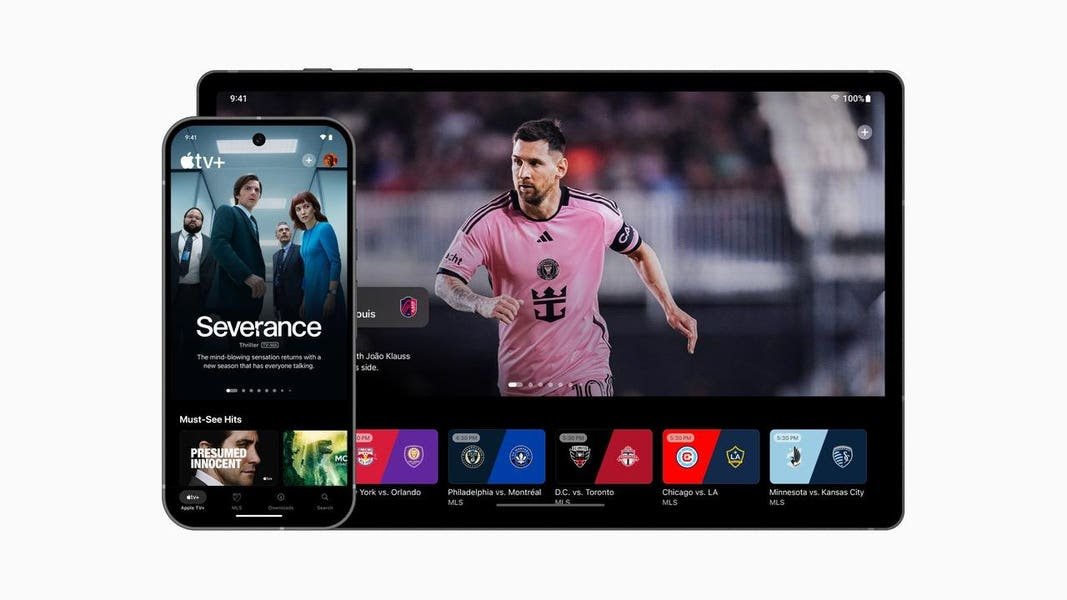
The wait is over—Apple’s TV app is finally on Android devices. If you’re an Android user who’s been eyeing Apple TV shows or movies but didn’t want to switch ecosystems, this is great news. Apple’s move makes it easier than ever to stream your favorite content, and honestly, it’s about time. So, what does this mean for Android users? And more importantly, how well does it actually work? Let’s dive in.
Why the Apple TV App Coming to Android Devices Is a Big Deal
For years, Apple kept its TV app exclusive to its own devices—iPhones, iPads, and Apple TVs—forcing non-Apple users to either miss out on its content or find workarounds. Sure, you could access Apple TV+ through a web browser, but who wants to deal with that on a phone? Now, with the Apple TV app on Android, that hassle disappears.
This isn’t just about convenience. It’s about Apple expanding its reach in a big way. More people can now subscribe to Apple TV+, rent movies, or buy digital content straight from their Android devices. It also puts Apple in a better position to compete with streaming giants like Netflix and Disney+—and let’s be real, the more competition, the better it is for all of us.
What Can You Do with the Apple TV App on Android?
If you’re wondering whether the experience is the same as on an iPhone, the short answer is: mostly, yes. The Apple TV app on Android comes packed with everything Apple users have had for years:
- Access to Apple TV+ with exclusive shows like “Ted Lasso” and “Severance.”
- The ability to rent or buy movies, including classics and the latest releases.
- A personalized “Up Next” section to keep track of what you’re watching.
- Support for content purchased through iTunes (yes, iTunes still exists… kind of).
For Android users who’ve been curious about Apple’s shows, this is a big win. You can now watch Apple Originals without awkward workarounds or streaming from your laptop.
How Does the Apple TV App Perform on Android?
This is the part everyone really cares about: Does it work well? No one wants a laggy, half-baked app that feels like an afterthought. Thankfully, the early impressions seem positive. The interface looks familiar if you’ve used an Apple device before—sleek and minimal. Navigation is smooth, content loads quickly, and the search function actually works well (which isn’t always the case with streaming apps).
One surprising thing? No in-app purchases. That means if you want to subscribe to Apple TV+ or rent a movie, you’ll have to do it through a web browser first. It’s not a huge deal, but it is a slight nuisance. Apple avoids Google Play’s commission fees this way, but it does make for a clunkier user experience.
Streaming Quality and Features
As for playback, the app supports up to 4K HDR streaming where available, which is nice. Whether you’re watching on a phone screen or casting to a TV, the quality holds up—with minimal buffering, assuming your internet is solid.
There’s also support for offline downloads, which is perfect if you’re traveling or have a spotty connection. Just grab your shows or movies beforehand, and you’re good to go.
Is This the Start of Apple Embracing Android?
Apple bringing its TV app to Android might not seem like a huge shift, but in a way, it signals something bigger. Apple is traditionally known for keeping things locked into its own ecosystem. Yet, we’ve seen little cracks in that approach lately—Apple Music launched on Android a while ago, and now Apple TV is following suit.
Could this lead to even more Apple services coming to Android? Maybe. iMessage seems like an impossibility, but who knows? If Apple wants more subscribers, putting its content and services on every platform makes sense.
The Verdict: Should You Download the Apple TV App on Android?
If you enjoy high-quality streaming content—or you’ve been itching to watch an Apple exclusive—then yes, you should absolutely download the Apple TV app for Android. It’s easy to use, the streaming quality is excellent, and it gives Android users another premium content option.
That being said, the lack of in-app purchases is a bit of a hassle, and Apple isn’t exactly bending over backward to make things seamless for Android users. But if that doesn’t bother you too much, it’s a solid addition to your streaming lineup.
So, are you excited to finally have Apple’s TV app on Android, or do you think it’s too little, too late? Either way, it’s nice to have another way to watch great content—no Apple device required.

by TechNova | Feb 12, 2025 | Tech Insights
The Apple Health Study is officially here, and if you’ve ever been curious about how your daily health data can contribute to medical research, now’s your chance to get involved. Apple has teamed up with Brigham and Women’s Hospital to launch this groundbreaking initiative, and the best part? It’s open to everyday people like you and me. No medical degree required—just an iPhone, an Apple Watch, and a willingness to share some insights about your health.
What Is the Apple Health Study?
At its core, the Apple Health Study is all about gathering real-world health data to fuel medical discoveries. It’s a massive research effort designed to track various health metrics and uncover trends that could help doctors and scientists tackle major wellness issues. Think of it as crowd-sourced science, powered by the Apple devices you already use.
Apple has dabbled in health studies before, focusing on things like heart health and mobility. But this time, the scope seems broader. The company is using the Apple Watch and Health app to collect data that could unlock insights into a range of conditions—from heart disease to sleep patterns.
How to Join the Apple Health Study
Joining is surprisingly simple, and you don’t need to be a health expert to qualify. Apple’s goal is to get as many diverse participants as possible, so signing up is a breeze. Here’s how you can be part of it:
- Check Your Eligibility: You’ll need an iPhone and an Apple Watch to participate.
- Open the Health App: Apple makes it convenient—just navigate to the “Studies” section.
- Agree to the Terms: Since this is a real medical research effort, you’ll need to give consent for your data to be used.
- Wear Your Apple Watch Regularly: The study collects data passively, which means you won’t have to do much beyond your everyday routine.
Once you’re in, the study will use sensors in your Apple Watch and iPhone to track things like heart rate, movement, and sleep quality. No extra effort required—just go about your day, and your data will seamlessly contribute to something bigger.
Why Should You Participate?
I get it. The idea of sharing your health data might make you pause. But here’s the thing: studies like these are how we make progress in medicine. The data Apple collects could help researchers detect early signs of diseases, improve treatments, and maybe even save lives down the road.
Personally, I’ve always been fascinated by health tech. I remember the first time my Apple Watch sent me an alert about an irregular heartbeat. It was a wake-up call that made me take my heart health more seriously. Imagine if something as simple as wearing your watch every day could help doctors make groundbreaking discoveries. That’s powerful.
Is It Safe to Share Your Data?
Apple is big on privacy, and they emphasize that all health data is anonymized and encrypted. That means your personal details aren’t tied directly to the study results. Plus, you’re in control—you can opt out anytime if you change your mind.
What Happens After You Join?
Once you sign up, the study runs quietly in the background. Your watch keeps doing its thing, tracking movement, heart rate, and other key metrics. You won’t need to log measurements manually or fill out endless surveys—Apple has designed this for seamless participation.
That said, if you enjoy checking your stats, you can still track your daily health trends inside the Health app. Seeing your progress unfold over time can be a great motivator to stay active, get better sleep, or just be more mindful of your well-being.
Will You Get Personal Health Insights?
This is where things get interesting. While the study aims to improve medical research as a whole, there’s a chance it could also give you valuable insights into your own health. If Apple finds something significant—like irregular heart rhythms—you may even get a notification that prompts you to follow up with a doctor.
Think about it: countless people have discovered hidden health conditions thanks to their Apple Watch. The potential for early detection alone makes participating worthwhile.
Final Thoughts: Should You Sign Up?
Look, if you’re on the fence, I totally get it. Sharing health data is a personal decision. But here’s my take—if you already trust Apple products to help track your workouts, sleep, and heart rate, why not let that data contribute to something bigger?
Medical breakthroughs don’t just happen in labs. They happen when real people, living real lives, provide pieces of the health puzzle that researchers can analyze. And since the study runs passively in the background, it’s probably one of the easiest ways to contribute to science without changing your daily routine.
So, what do you think? Are you in? If you’ve got an iPhone, an Apple Watch, and an interest in shaping the future of health research, this could be your chance to be part of something meaningful. After all, innovation starts with people like us.
by TechNova | Feb 12, 2025 | Tech Insights
The Windows 10 KB5051974 update has made quite the entrance, and not everyone is thrilled about it. If you’ve noticed a sudden appearance of the new Microsoft Outlook app on your computer, you’re not alone. This update is quietly rolling out a revamped version of Outlook, and—surprise—it installs automatically. Whether you love it or hate it, it’s here, and we need to talk about what that means for you.
What’s Changing with the Windows 10 KB5051974 Update?
Let’s get straight to it: this update is pushing the new Microsoft Outlook onto your system without asking for permission. If you’re used to the classic Outlook app or prefer another email client, this might feel a little intrusive. Microsoft’s goal here is to transition users toward a more web-based, modern experience. But is this actually an improvement?
The new Outlook app is essentially a web app (PWA), meaning it’s built to work like the Outlook Web experience rather than the traditional desktop version. That means a sleeker interface, deeper cloud integration, and—unfortunately—some missing features that long-time Outlook users rely on.
How the New Outlook Affects Your Workflow
If you weren’t expecting to switch email apps, this update could throw a wrench into your routine. Here’s what you’ll notice:
- Surprise Installation: The app appears in your Start menu whether you asked for it or not.
- Web-Based Features: The new Outlook relies heavily on cloud integration, making it more like a web app than the old-school desktop client.
- Missing Features: Certain classic Outlook features, such as offline functionality and full add-in support, aren’t available yet.
- Customization Differences: Some familiar settings from the legacy Outlook may not transfer over.
Now, if you’re open to trying something new, this update could be a welcome change. The redesigned interface is clean and user-friendly, making email management a bit smoother, especially for those already using the web version.
Can You Get Rid of the New Outlook?
Maybe you’re thinking, “I didn’t ask for this, so how do I remove it?” Thankfully, you do have some control here. While Windows 10 KB5051974 installs the new Outlook automatically, it doesn’t force you to use it. You can simply ignore it or even uninstall it if you prefer sticking with the classic version.
To remove the new Outlook:
- Open the Start menu and find the new Outlook app.
- Right-click on it and choose Uninstall.
- Confirm your selection.
That’s it—at least for now. However, keep in mind that future Windows updates might try to reinstall it again, so stay vigilant if you strongly prefer the old version.
Why Is Microsoft Pushing This Update?
Microsoft has been making a strong push toward unified experiences across different devices. The new Outlook is part of that vision, aiming to create a consistent experience whether you’re checking email from a browser, phone, or desktop.
From a business perspective, this move makes sense. It streamlines development, integrates deeper with Microsoft 365 services, and nudges users toward cloud-based productivity. But that doesn’t mean everyone is on board with the change, especially those who rely on Outlook’s traditional features.
Is the New Outlook Worth Trying?
So, is this version of Outlook something you should embrace? It depends. If you live in the Microsoft 365 ecosystem and use Outlook Web often, you might find the new version more convenient. It’s snappy, modern, and integrates well with cloud services.
However, if you need advanced offline support, use legacy Outlook plugins, or just don’t want an enforced change, this version won’t be your favorite. Either way, it’s worth testing for a few days before making a final decision.
What You Can Do to Prepare
If you’re worried about future updates shaking up your workflow, here are a few things you can do:
- Keep an eye on your updates—sometimes Windows changes things quietly.
- Test the new Outlook to see if it meets your needs before uninstalling.
- Make sure you have backups of your email accounts and settings, just in case something shifts unexpectedly.
The Bottom Line on Windows 10 KB5051974
Change is never easy, especially when it feels forced. The Windows 10 KB5051974 update drops the new Microsoft Outlook onto your system whether you want it or not. While it brings a fresh design and cloud-based integration, not everyone will appreciate the shift.
At the end of the day, Microsoft is pushing toward a more unified, web-focused Outlook experience. Some users will love it, while others will be scrambling to uninstall it. If you fall into the latter camp, don’t stress—you still have options.
So, what’s your take? Are you embracing the new Outlook, or are you sticking with the classic version as long as possible?

by TechNova | Feb 11, 2025 | Tech Insights
The PlayStation State of Play February 2025 has officially been announced, and you know what that means—exciting reveals, long-awaited updates, and maybe even a few surprises Sony has been keeping under wraps. If you’re anything like me, these showcases bring out that kid-at-Christmas-morning energy. Whether it’s teasers for upcoming PlayStation exclusives or unexpected game drops, there’s always something to get hyped about. So, what can we expect this time? Let’s dive in.
What to Expect from PlayStation State of Play
Every PlayStation State of Play brings a mix of game trailers, developer insights, and sometimes those “one more thing” moments that leave fans buzzing. Sony has kept details under wraps, but based on previous patterns, we can make some educated guesses.
- Big PS5 Exclusives: Will we finally get a closer look at what’s next for beloved franchises?
- PlayStation VR2 Updates: Sony has been pushing VR hard. Could we see a new batch of immersive experiences?
- Third-Party Surprises: Indie gems and blockbuster hits alike have been showcased before.
- PlayStation Plus Announcements: Any updates to PS Plus tiers or new perks for subscribers?
Of course, there’s always the wildcard factor. A sudden remake of a beloved classic? A brand-new IP reveal? The unpredictability is what makes these showcases so much fun.
Could This Be the Year of a Major PlayStation Surprise?
Let’s be real—Sony knows how to drop bombshells. Think back to past moments when they casually unveiled a game that changed everything. Remember when they first teased that iconic sequel you’d been waiting years for? Moments like that make PlayStation events unmissable.
Now, there’s been plenty of speculation about a new major franchise making its debut. Maybe it’s time for a fresh, first-party open-world experience? Or how about that one cult-favorite series that deserves a comeback? (C’mon, Sony, you know the one.) Whatever it is, fans are watching closely, hoping for that next jaw-dropping moment.
What About PlayStation VR2?
Sony has continued pushing PlayStation VR2 with impressive releases, but the lineup could use a big splash. Could we see a major studio commit to an exclusive blockbuster? These showcases often highlight new VR titles, and PlayStation seems eager to prove that their latest headset is more than just a fun gadget.
Imagine a fully immersive, AAA experience built from the ground up for VR. That’s what the technology needs—a showcase game that makes everyone reconsider owning the headset. Maybe this will be the event where Sony finally shows off that killer app.
The Future of PlayStation VR and State of Play
The real question is whether Sony continues to invest in VR at the same level as before. VR has a dedicated fanbase, but it’s still far from the mainstream. If we see significant VR announcements, it could mean Sony is ready to double down. If not, well… we might have to accept that PlayStation VR2 won’t get the love it deserves.
Fans Are Hoping for Major Franchises to Make a Comeback
Every PlayStation State of Play brings renewed hope for the return of long-dormant franchises. Whether it’s an old-school PlayStation classic getting a remake or a sequel to a beloved title, fans have plenty of wish-list items.
Some names always pop up in speculation threads. Could we see the long-rumored return of a major PlayStation icon? Will a beloved adventure or action title finally get its moment in the spotlight again? One thing’s for sure—Sony thrives on nostalgia, and we wouldn’t be surprised if something classic makes a comeback.
Final Thoughts: Why This Announcement Matters
Every PlayStation State of Play is a moment for gamers to come together, share their excitement, and speculate wildly (sometimes correctly, often hilariously wrong). It reminds us why we love gaming—the anticipation, the surprises, and the sheer magic of seeing what’s next.
Whether this event delivers jaw-dropping revelations or just teases what’s coming later in the year, one thing is certain: PlayStation fans will be watching, analyzing, and celebrating every big moment. So, grab your snacks, set your reminders, and get ready for another round of incredible gaming news!
by TechNova | Feb 11, 2025 | Tech Insights
Let’s be real—AI dependency lowers critical thinking skills. You’ve probably felt it yourself. Maybe you used to solve problems on your own, but now? You reach for ChatGPT or Google the second you hit a snag. It’s easy, it’s fast… and it’s making us a little lazy. That’s not just my opinion—there’s actual research showing that when we lean too hard on AI, our brains stop working as hard as they used to.
How AI Dependency Lowers Our Ability to Think Critically
Imagine you’re trying to write an email for work. You know what you want to say, but instead of figuring out the best way to phrase it, you throw it into an AI tool and let it do the work. Sounds harmless, right?
Now repeat that process every day for months. Over time, you start losing your natural writing flow. Your problem-solving muscles shrink. It’s like relying on GPS so much that you stop remembering how to navigate your own city. AI dependency lowers our engagement with difficult tasks, and when we let a machine do the thinking for us, we get out of practice.
The Trade-Off: Convenience vs. Mental Effort
Look, I love AI. It’s an incredible tool, and I use it all the time. But I also notice that when I let AI handle too much, I start to feel… fuzzy. Less sharp. I second-guess myself more. That’s because our brains work like muscles—they need exercise to stay strong.
When you struggle with a problem, your brain connects new ideas. It figures things out. It grows. But when AI hands you an instant answer, you skip all of that. Over time, that shortcut becomes a habit, and before you know it, you’re outsourcing your thinking without even realizing it.
Warning Signs That AI Dependency Lowers Your Thinking Skills
How can you tell if AI is doing too much of the heavy lifting? Here are a few signs:
- You feel uncomfortable solving problems without AI’s help.
- Your first instinct is to ask AI instead of thinking it through.
- Creative tasks feel harder because you’re used to auto-generated ideas.
- You struggle to put thoughts into words without assistance.
- Basic problem-solving feels frustrating instead of natural.
Sound familiar? If so, don’t panic—it just means it’s time to take back some control.
How to Use AI Without Losing Your Edge
The goal isn’t to ditch AI entirely. That would be like throwing out your calculator just because you want to stay sharp at math. It’s about balance. Here are a few ways to keep AI as a helpful assistant, not a crutch:
- Pause before asking AI. Try solving the problem on your own first. Even if you don’t get the best answer, you’ll stretch your thinking.
- Edit AI’s suggestions heavily. Don’t just use them as-is—change them, reword them, make them your own.
- Keep practicing problem-solving without it. If you’re always using AI for writing, challenge yourself to go without it sometimes.
- Think critically about AI’s outputs. Instead of instantly accepting an answer, ask yourself: Does this sound right? How else could I do this?
- Strengthen your own skills. Read, think, and create without relying on AI. Engage in activities that force your brain to work independently.
A little effort goes a long way. The more you actively engage in thinking for yourself, the less you’ll feel dependent on AI to do the work for you.
Final Thoughts: AI Should Assist, Not Replace Thinking
At the end of the day, AI isn’t the problem—our reliance on it is. Used wisely, AI can be an incredible tool that boosts creativity, speeds up work, and makes tasks easier. But if we lean too hard on it, our brains suffer. And no one wants to wake up one day realizing they’ve forgotten how to think for themselves.
So next time you need an answer, try this: Think first, then check AI. Let it be a partner, not your brain’s replacement. Your critical thinking skills are worth protecting, and keeping them sharp will serve you in ways no AI ever can.
