
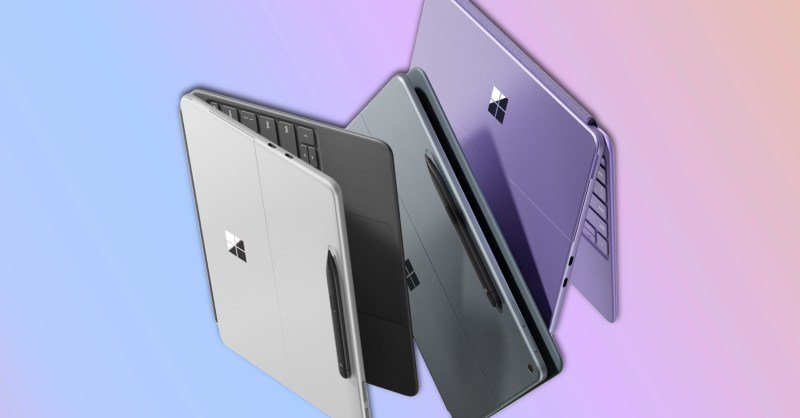
If you’ve ever felt like your tablet just couldn’t keep up with your life, you’re going to love the Microsoft Surface Pro tablet performance boost. Seriously, I’ve been using tablets for years—mostly for reading, emails, some light streaming. But when it came to real work? They just didn’t cut it. That’s why I’d always end up dragging my laptop around even for small tasks. But something finally clicked with the Microsoft Surface Pro, and it’s got me thinking… maybe Windows tablets are ready to shine.
Why the Surface Pro Finally Feels Like a Real Computer
Let’s be real—most tablets feel like they’re pretending to be something they’re not. Fancy designs, slim bodies, quirky keyboards… but scratch the surface (no pun intended), and performance just wasn’t there. But this recent generation of the Surface Pro? It’s changed the game.
With its 12th-gen Intel chips and a sharper focus on performance, the Surface Pro is genuinely capable now. Like, legit “I can edit photos AND have 20 browser tabs open” kind of capable. That’s a big deal. Especially for someone like me who’s always juggling tasks and minimizing windows like a maniac.
The Surface Pro has always looked the part—sleek, premium, feels great in the hand. But now, the internals match the promise. It no longer feels like you’re sacrificing power for portability. You’re getting both.
Performance Boost That Feels Instant
So what does this Surface Pro performance boost actually feel like on a daily basis? I’ll sum it up in three words: fast, fluid, and freeing.
- Fast: Apps open instantly. Documents save without a hiccup. Multi-tasking doesn’t slow things down.
- Fluid: The 120Hz refresh rate makes everything feel buttery smooth. Scrolling? Like silk. Writing with the Surface Pen? Ridiculously responsive.
- Freeing: I can leave my laptop behind and not feel anxious. That’s a first for me.
I recently took the Surface Pro on a weekend trip—left my laptop at home on purpose. I was nervous, but guess what? It kept up just fine. Typed up a few posts, edited some photos, watched Netflix, even jumped into a Zoom call using the front camera. Didn’t miss my laptop at all.
Battery Life That Actually Lives Up to the Hype
What really ties it all together is the improved battery life. Earlier versions of the Surface were notorious for dying before the day was over. But now? We’re talking all-day use.
I started my morning at a coffee shop around 9 a.m., worked straight through until lunchtime, had a video call, managed some photo edits—and it still had juice left at 5 p.m. That’s huge, especially for travelers or folks like me who hop from errands to meetings in a single breath.
The Microsoft Surface Pro Form Factor Still Rocks
One thing that’s never changed and still deserves praise: the form factor. The kickstand is iconic for a reason. Whether I’m typing at a desk, sketching ideas with the pen, or propping it up on the couch to binge a series—it adapts to me, not the other way around.
And let’s talk about the keyboard. It’s not just a flimsy accessory anymore. The latest Type Cover is backlit, solid, and has actual travel. I’ve written this entire article on it—and if that’s not a stamp of approval, I don’t know what is.
Is Windows Finally Good on Tablets?
This is the big question. And honestly? I think the answer is yes.
Windows 11 feels more touch-friendly than ever. It’s not perfect, but it’s miles ahead of where it used to be. Icons are better spaced. Gestures are intuitive. And with auto-scaling improvements, things don’t randomly appear microscopic or massive for no reason.
I wouldn’t have said this a year ago, but the combo of responsive hardware and smarter software makes Windows on a tablet not just usable—but enjoyable.
Who Is the Microsoft Surface Pro Really For?
Here’s where it gets interesting. Five years ago, I’d have said this was a device for niche users—graphic designers, business execs, maybe students with deep pockets. But now? The improved performance is making it attractive to a broader crowd.
- Students: Light enough to carry all day, powerful enough to run full desktop apps like Word or Excel.
- Freelancers: Whether you’re writing, editing, or designing, the Surface Pro can handle the workload.
- Everyday multitaskers: If you’re someone who hops between email, streaming, spreadsheets, and social media—you’ll love this machine.
I always tell my friends: if your work depends on flexibility and you want one device to rule them all, this might just be it.
Final Thoughts on the Microsoft Surface Pro Evolution
For me, the Microsoft Surface Pro went from a “nice-to-have gadget” to a reliable daily driver. It’s no longer content with being a tablet that occasionally dabbles in laptop territory. Now it’s confidently both—and that’s something I didn’t expect to say.
Is it perfect? Nah. I still think Windows 11 has room to grow in certain touch scenarios, and accessories can get pricey. But the trade-offs are getting smaller and the benefits much bigger.
This isn’t just a performance bump. It’s a turning point.
And if you’ve ever felt let down by a tablet before, trust me—you might want to give the new Surface Pro a closer look. It could surprise you the same way it surprised me.