
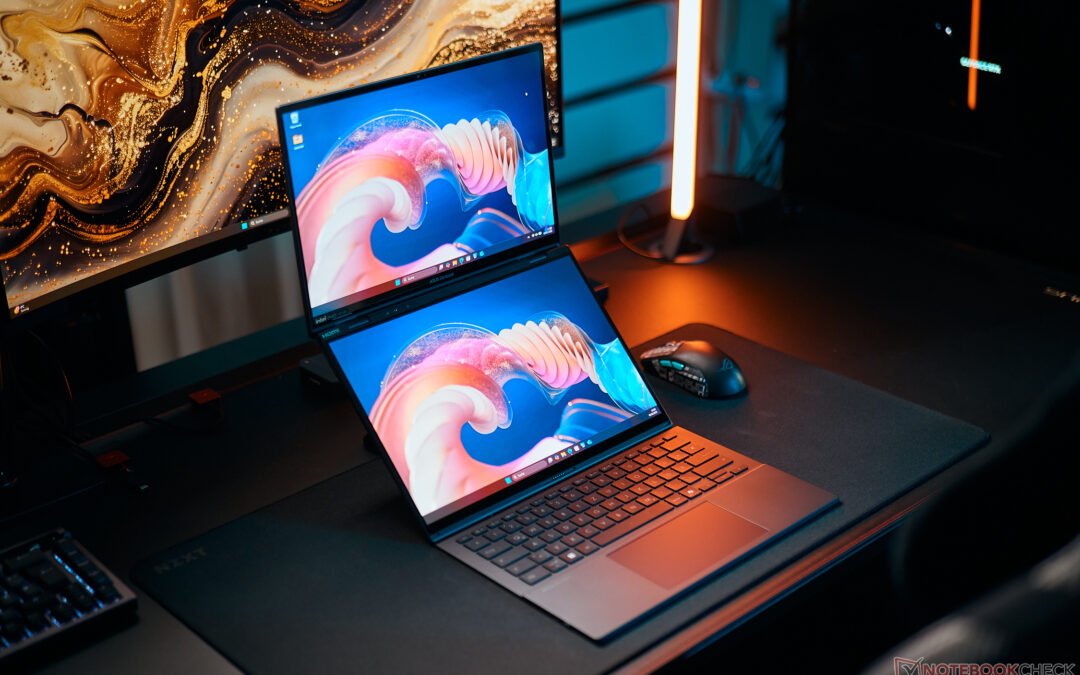
If you’ve ever wished for a laptop that truly embraces the idea of productivity and multitasking, this Asus ZenBook Duo OLED review and features breakdown is exactly what you need. Asus has been pushing the boundaries of dual-screen laptops for years, and the latest ZenBook Duo takes things even further. With a stunning OLED display and a revamped design, this laptop makes you rethink what’s possible in a mobile workstation.
First Impressions: A Bold and Stunning Redesign
The first thing you’ll notice about the Asus ZenBook Duo is the sheer futuristic appeal. This is not your standard clamshell laptop. The dual-screen setup immediately draws attention, especially when you flip open the lid and reveal that breathtaking OLED display. The slim bezels, the elegant metal chassis, and the innovative engineering make it feel like a machine built for professionals who want style and substance.
But this laptop isn’t just about looks. Asus manages to balance aesthetics with practicality, ensuring that every aspect serves a functional purpose. From the ultra-smooth hinge to the improved thermal management, it’s clear that Asus designed this with actual users in mind.
Dual Screens, Double the Productivity
Now, let’s talk about that dual-screen experience. Asus has been refining this concept for a while, and it shows. The primary OLED display is a gorgeous 14-inch panel with deep blacks, punchy colors, and incredible clarity. But the magic happens when you combine it with the secondary display that seamlessly integrates below it.
If you’re someone who juggles multiple tasks—be it video editing, coding, or managing spreadsheets—you’ll love what this screen can do. Dragging windows between displays is effortless, and the extra screen space means fewer interruptions in your workflow. Imagine editing a video while keeping your toolbars neatly organized on the second screen or writing up a report while having research material open right below—it’s a game-changer.
OLED Brilliance: Why It Matters
If you’ve never used an OLED laptop before, prepare to be spoiled. The colors are rich, the contrast is insane, and everything just pops off the screen. Whether you’re watching videos or designing in Photoshop, the visual quality is stunning. Add in the high refresh rate, and it makes scrolling and animations feel buttery smooth.
Performance: More Than Just a Pretty Face
A great design means nothing if the performance can’t keep up. Thankfully, the Asus ZenBook Duo delivers where it counts. Powered by the latest Intel Arrow Lake processors, it doesn’t struggle under pressure. Whether you’re crunching numbers, editing 4K footage, or just running a dozen Chrome tabs (we’ve all been there), it handles everything like a champ.
- CPU Power: Intel’s Arrow Lake series ensures a balance between power efficiency and top-tier performance.
- Graphics: Depending on the configuration, you can get integrated graphics or a dedicated GPU for creative work.
- Memory & Storage: With up to 32GB RAM and fast SSD options, load times are practically nonexistent.
As someone who constantly switches between applications, I was surprised at how smoothly everything ran. Even throwing in some light gaming, the laptop barely broke a sweat. The upgraded cooling system does a great job of keeping things quiet too—no sudden jet-engine noises when you’re in the middle of a deep work session.
Battery Life: How Long Can It Keep Up?
One common concern with high-performance, dual-screen laptops is battery life. More screens usually mean more power drain, right? Surprisingly, Asus has fine-tuned the power management, and you’re looking at around 8-10 hours with normal use. That’s enough to get through a full workday if you manage brightness and background apps properly.
Typing, Trackpad, and Ergonomics: A Unique Approach
Because of the dual-screen setup, there isn’t a lot of room for a typical keyboard and trackpad configuration. The keyboard is pushed down to the lower half of the chassis, while the trackpad sits to the right. It definitely takes some getting used to, but if you’re someone who uses a mouse most of the time, it won’t be a huge deal.
Typing feels good, though. The keys have tactile feedback, and they’re well-spaced. If you’ve used Asus laptops before, the experience here is familiar—responsive and comfortable. The built-in stylus support adds another layer of functionality, especially for designers.
Is the Asus ZenBook Duo OLED Right for You?
This laptop clearly isn’t made for casual users. If all you need is a basic everyday computer for emails and Netflix, it’s overkill. But if you love innovation, multitasking, and cutting-edge tech, it’s a dream machine. Whether you’re a content creator, developer, or power user, the Asus ZenBook Duo is built to make your workflow smoother and more enjoyable.
Would I recommend it? Without hesitation—but with one small caveat. You need to embrace the dual-screen experience and be ready to tweak your workflow a bit to get the most out of it. If you’re up for that, this is hands-down one of the most exciting laptops on the market right now.
Final Thoughts: A Step into the Future
Asus continues to push the envelope with the ZenBook Duo lineup, proving that laptops don’t have to follow the same old design formula. The OLED display, the seamless integration of the second screen, and the beastly performance make this laptop a compelling choice for power users.
So, what’s the verdict? If you need a laptop that works as hard as you do—and looks amazing while doing it—the Asus ZenBook Duo OLED is easily one of the best options out there.